[1]:
import fdfi
print('FDFI version:', fdfi.__version__)
FDFI version: 0.0.9
OTExplainer: Gaussian Optimal Transport
This tutorial provides a deep dive into the OTExplainer, which uses Gaussian optimal transport for computing feature importance.
What You’ll Learn
Mathematical foundation of Gaussian OT
Key hyperparameters and their effects
When to use OTExplainer vs other methods
Best practices for real-world usage
[2]:
import numpy as np
import matplotlib.pyplot as plt
from fdfi.explainers import OTExplainer
from fdfi.plots import correlation_heatmap, diagnostics_plot, summary_bar

np.random.seed(42)
Mathematical Background
The key insight of OTExplainer is to use the Gaussian optimal transport map to create counterfactual distributions.
Given data \(X\) with mean \(\mu\) and covariance \(\Sigma\), we compute:
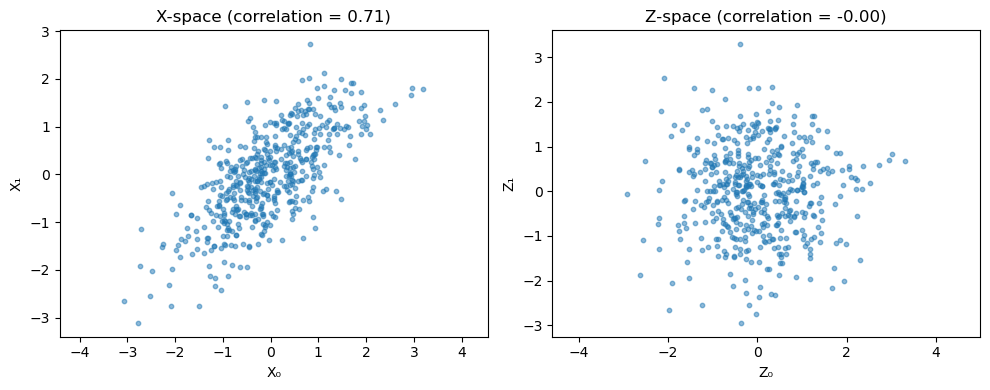
where \(\Sigma = LL^T\) (Cholesky decomposition). In Z-space, features are uncorrelated.
To measure the importance of feature \(j\), we:
Replace \(Z_j\) with an independent sample from \(N(0, 1)\)
Transform back to X-space
Compare model outputs
Effect of nsamples
The nsamples parameter controls Monte Carlo variance. Let’s see its effect:
[5]:
# Compare different nsamples values
nsamples_values = [10, 50, 200]
results_by_nsamples = {}
feature_names = [f"X{i}" for i in range(n_features)]

for ns in nsamples_values:
    explainer = OTExplainer(model, data=X_train, nsamples=ns)
    results_by_nsamples[ns] = explainer(X_test)

fig, axes = plt.subplots(1, len(nsamples_values), figsize=(13, 4), sharex=True)
for ax, ns in zip(axes, nsamples_values):
    summary_bar(
        results_by_nsamples[ns]["phi_X"],
        results_by_nsamples[ns]["se_X"],
        feature_names,
        ax=ax,
        show=False,
        title=f"nsamples={ns}",
        max_display=n_features,
    )
fig
[5]:
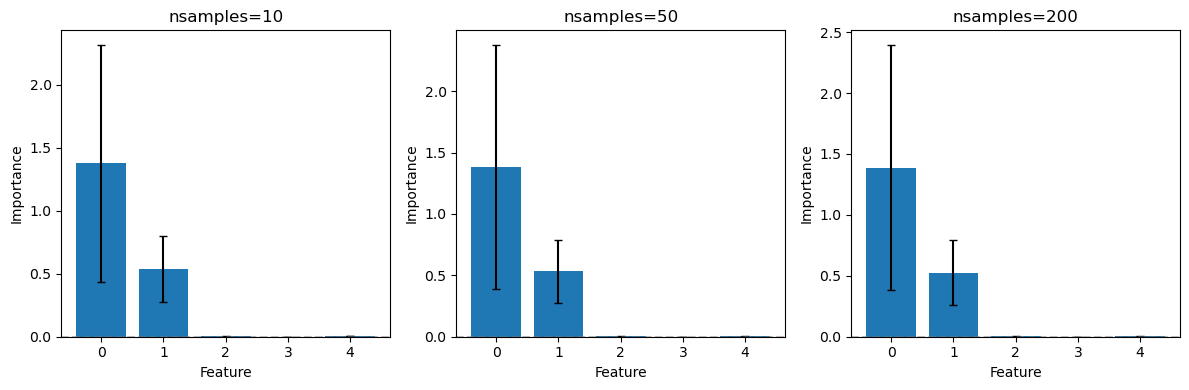

Key observation: Higher nsamples gives smaller error bars (lower variance) but takes longer to compute.
Effect of sampling_method
OTExplainer supports three sampling methods for counterfactual generation:
[6]:
# Compare sampling methods
sampling_methods = ["resample", "permutation", "normal"]
results_by_method = {}

for method in sampling_methods:
    explainer = OTExplainer(
        model,
        data=X_train,
        nsamples=100,
        sampling_method=method
    )
    results_by_method[method] = explainer(X_test)

# Compare results
print("Feature importance by sampling method:")
print("-" * 50)
print(f"{'Feature':>8}", end="")
for method in sampling_methods:
    print(f"{method:>12}", end="")
print()
print("-" * 50)

for i in range(n_features):
    print(f"{i:>8}", end="")
    for method in sampling_methods:
        phi = results_by_method[method]["phi_X"][i]
        print(f"{phi:>12.4f}", end="")
    print()
Feature importance by sampling method:
--------------------------------------------------
 Feature    resample permutation      normal
--------------------------------------------------
       0      1.3690      1.3081      1.3115
       1      0.5196      0.5108      0.5431
       2      0.0020      0.0020      0.0019
       3      0.0003      0.0003      0.0003
       4      0.0030      0.0029      0.0030
Sampling methods explained:
resample: Sample from the background data (preserves marginal distribution)permutation: Permute values within test set (no new values introduced)normal: Sample from standard normal (strongest Gaussian assumption)
Visualizing the Z-space Transformation
Let’s visualize how OTExplainer transforms correlated data to uncorrelated Z-space:
[7]:
# Create explainer and access internal matrices
explainer = OTExplainer(model, data=X_train, nsamples=50)
feature_names = [f"X{i}" for i in range(n_features)]

# Background feature correlation before whitening
correlation_heatmap(X_train, feature_names, show=False)

# Transform to Z-space
Z_train = (X_train - explainer.mean) @ explainer.L_inv

# Plot X-space vs Z-space
fig, axes = plt.subplots(1, 2, figsize=(10, 4))

# X-space (correlated)
axes[0].scatter(X_train[:, 0], X_train[:, 1], alpha=0.5, s=10)
axes[0].set_xlabel("X₀")
axes[0].set_ylabel("X₁")
axes[0].set_title(f"X-space (correlation = {np.corrcoef(X_train[:, 0], X_train[:, 1])[0, 1]:.2f})")
axes[0].axis('equal')

# Z-space (uncorrelated)
axes[1].scatter(Z_train[:, 0], Z_train[:, 1], alpha=0.5, s=10)
axes[1].set_xlabel("Z₀")
axes[1].set_ylabel("Z₁")
axes[1].set_title(f"Z-space (correlation = {np.corrcoef(Z_train[:, 0], Z_train[:, 1])[0, 1]:.2f})")
axes[1].axis('equal')

plt.tight_layout()
plt.show()

Shared Diagnostics and Summary
Use the built-in diagnostics and summary() methods for consistent reporting across OT/EOT/Flow explainers.
[8]:
_ = explainer(X_test)
diag = explainer.diagnostics
print("OT diagnostics")
print("-" * 50)
print(f"Latent independence (median dCor): {diag['latent_independence_median']:.6f} [{diag['latent_independence_label']}]")
print(f"Distribution fidelity (MMD):       {diag['distribution_fidelity_mmd']:.6f} [{diag['distribution_fidelity_label']}]")

print("\nX-space summary")
_ = explainer.summary(alpha=0.05, target='X', alternative='greater')


diagnostics_plot(diag, feature_names=feature_names, show=False)
OT diagnostics
--------------------------------------------------
Latent independence (median dCor): 0.066532 [GOOD]
Distribution fidelity (MMD):       0.000000 [GOOD]

X-space summary
==============================================================================
Feature Importance Results
==============================================================================
Method: OTExplainer
Number of units: 5
Significance level: 0.05
Alternative: greater
Margin method: gap
Practical margin: 0.0031
------------------------------------------------------------------------------
        Feature   Estimate    Std Err   CI Lower   CI Upper    P-value   Sig
------------------------------------------------------------------------------
              0     1.3843     0.5065     0.5511        inf     0.0032   ***
              1     0.5322     0.1313     0.3163        inf     0.0000   ***
              2     0.0020     0.0026    -0.0023        inf     0.6592
              3     0.0003     0.0026    -0.0039        inf     0.8615
              4     0.0031     0.0027    -0.0013        inf     0.5000
==============================================================================
Significant units: 2 / 5
---
Signif. codes:  0 '***' 0.01 '**' 0.05 '*' 0.1 ' ' 1
==============================================================================
[8]:
(<Figure size 1000x400 with 3 Axes>,
 array([<Axes: title={'center': 'FDFI Diagnostics'}, ylabel='Diagnostic value'>,
        <Axes: title={'center': 'Latent dCor Matrix'}>], dtype=object))

Best Practices
When to use OTExplainer
✅ Good for:
Continuous features
Roughly Gaussian data
Fast computation
Stable results
❌ Consider EOTExplainer for:
Heavily non-Gaussian data
Multimodal distributions
Mixed categorical/continuous features
Recommended settings
explainer = OTExplainer(
    model,
    data=X_train,
    nsamples=50,               # Good balance of speed/accuracy
    sampling_method="resample", # Preserves marginal distribution
)
Summary
Key takeaways:
OTExplainer uses Gaussian OT to disentangle correlated features.
Higher
nsamplesreduces variance at the cost of computation time.sampling_method="resample"is recommended for most cases.The transformation to Z-space removes correlations for clean attribution.
Shared diagnostics and
summary()provide standardized inference reporting.